How to analyze a wearable eye tracking recording
Did the participant look back at the package on the right? Follow a gaze recording from scene video to a count of visits and a measurement of dwell time in Kexxu Editor.
1. Check the gaze against the scene
Record and collect the session with the Eyetracking Hub. In your editor project, open the eye tracking analysis app. Select the scene video and its matching overlay datafile. Scrub to a moment when you know what the participant was looking at and check where the gaze marker lands.
2. Define what counts as looking at the package
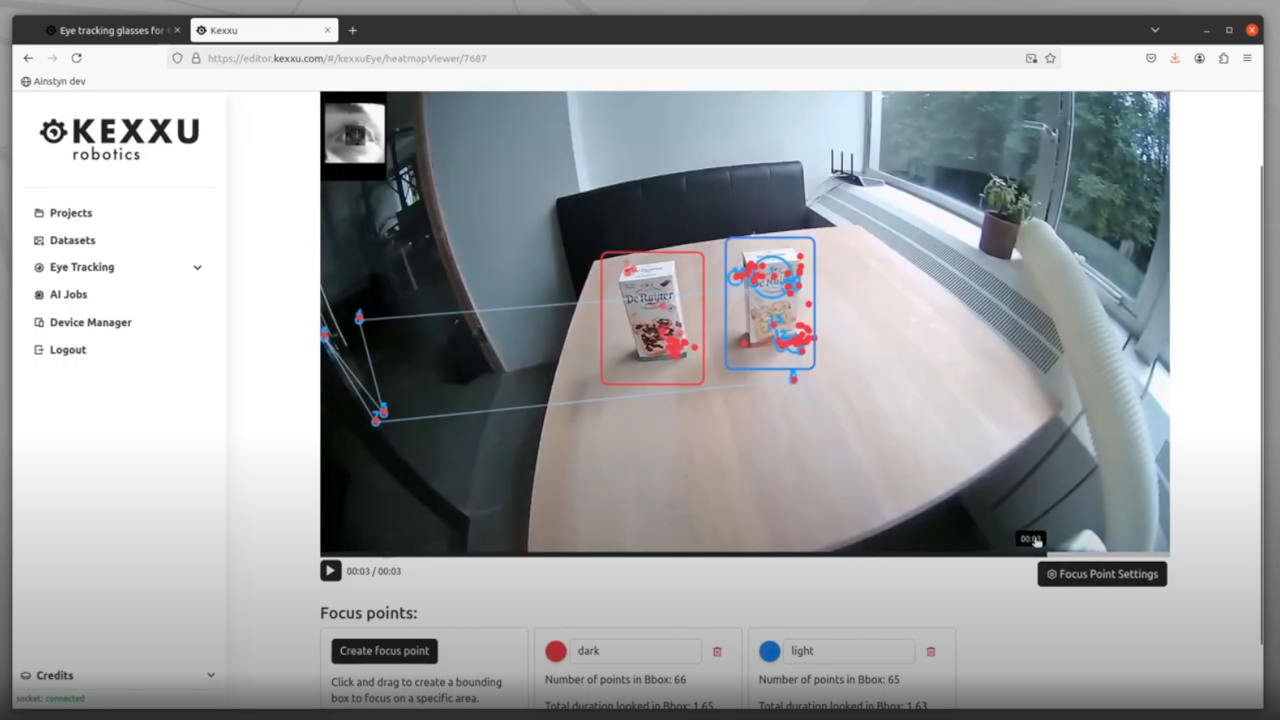
Under Areas of interest, draw a rectangle around the right package and name it “Right package”. A drawn rectangle stays at the same position in the frame. If the wearer turns their head, use a stabilized view with aligned gaze, or select matching object detection results to follow the target. Watch the Kexxu areas-of-interest recording.
3. Read the visits on the timeline
Find the package’s row on the object gaze timeline. Click a visit to replay the corresponding video. Dwell time adds up the time gaze spent inside the area. A revisit occurs when gaze returns after the configured minimum time outside it. Missing gaze samples alone do not establish a revisit.
To see where gaze settled within a visit, select a fixation and inspect its center and duration. One visit can contain several fixations.
4. Check the result in a CSV
Choose Export report → CSV → Download CSV. Filter recordType to visits for individual visits, or to areaSummaries for totals. Use areaId to match records for the same target.
| Visit | Start | End | Dwell time |
|---|---|---|---|
| First look | 1.20 s | 1.80 s | 0.60 s |
| Return | 3.00 s | 3.40 s | 0.40 s |
Here the participant looked at the package twice: two visits, one revisit, and 1.00 second of dwell time. The time spent looking away between visits is excluded. These example values illustrate the calculation.
Download the example CSV excerpt